
Balances, reminders, waived fees, and receipts
The ledger of what is due and paid, balance reminders with a pay link, waiving a fee, and HSA/FSA receipts.
For: Front deskManagersOwners
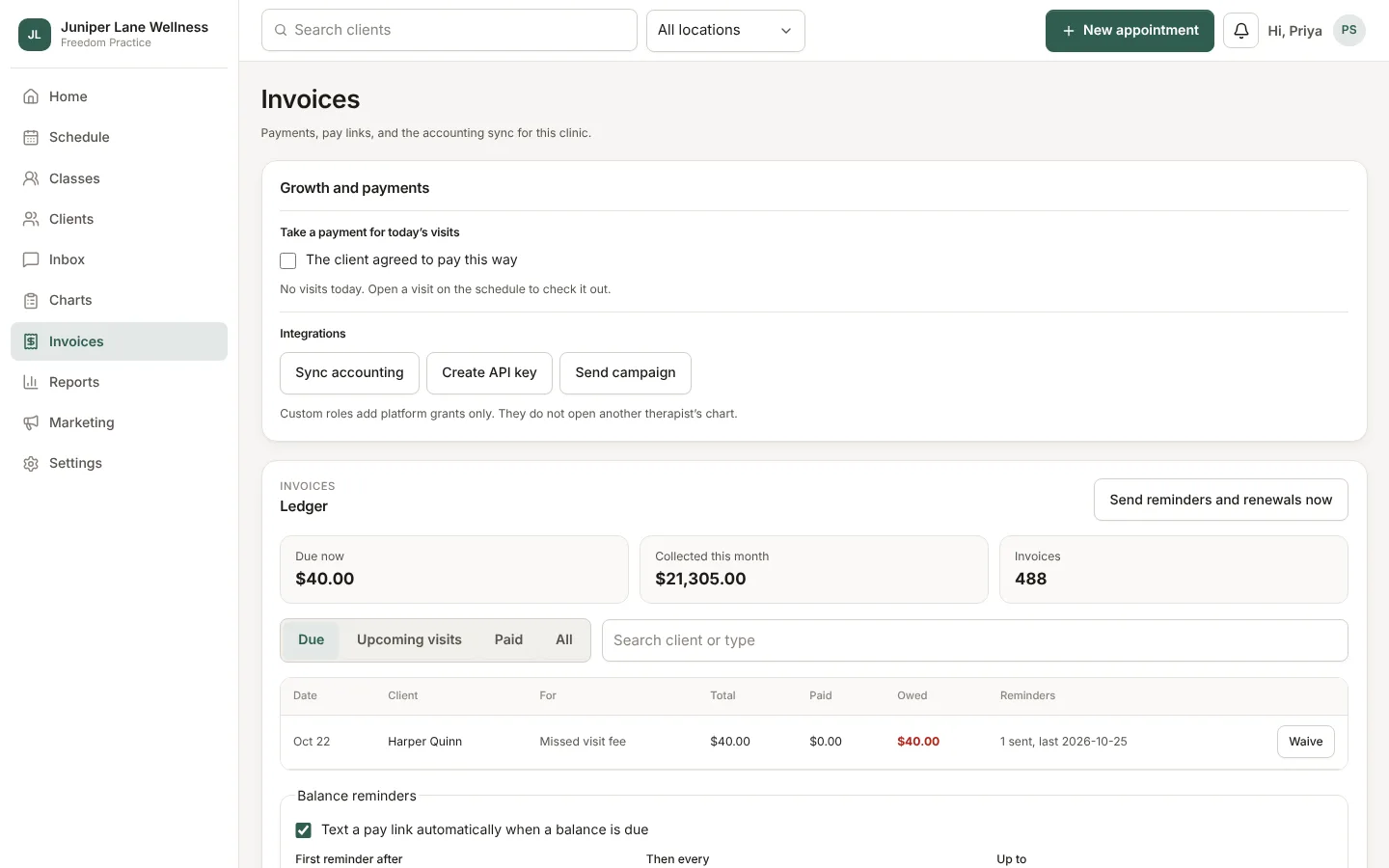
Open Invoices → Ledger to see every charge. Filter by due, upcoming, paid, or all, and search by client. Totals for what is due and what has come in sit at the top.
Balance reminders
Turn on balance reminders and choose how often. Clients get a text with a secure pay link; the text never says what the visit was. Send reminders and renewals now runs them right away instead of waiting for the daily run.
Waive a fee
On a ledger row, choose Waive and give a reason. The front desk can waive late cancellation and missed-visit fees; owners, admins, and managers can waive anything and see every waiver.
Receipts
Clients download receipts from the client hub. For HSA and FSA claims, the itemized receipt lists each item with your address, tax ID, and NPI. Set those once in Settings → Retail and tax.
Older balances
Accounts receivable groups what is owed by age (0–30, 31–60, and so on) and downloads as a CSV. Package and gift card balances shows what clients have left to use.
Still stuck? Contact support, or in the app open your account menu and choose Contact support.